Parallax
Parallax is Orbit's creative studio in a single editor: area, motion, 3D, video and generation in one document, in the browser and on the desktop.
- Client: Orbit GmbH
- Built by: Orbit (Jan)
- Period: 2026
Parallax is Orbit's creative studio in a single editor: area, motion, 3D, video and generation in one document, in the browser and on the desktop.
In most studios, an image moves through five programs: Photoshop for the area, After Effects for motion, Blender or Maya for 3D, Substance for material, Premiere for the cut. Each handover costs an export, a license, and usually a version that is no longer correct. New tools like Figma, Spline, or Runway solve each a piece of this. In May 2026, Orbit decides to bring the entire path into one document, with two promises that are rarely found: Humans and Agents work in it on equal terms, in the same document, at the same time. And what is finished does not end as a file on a drive, but goes directly as a building block to Relay, the platform that delivers it.
• Area, motion, 3D and video in one document • Timeline, Dope Sheet and curves • Materials with path tracking • Models on your own graphics card • Agents that suggest variants • Handover as a building block to Relay • The films of the case studies • Print module for your own 3D printers
One document, many disciplines
In Parallax, 2D vectors, 3D meshes, keyframes, video clips, and generated results reside in the same layer tree and the same data model. This is the core and at the same time the difficulty: Every discipline reads and writes the same model, multiple people and agents edit it simultaneously, and a shared renderer displays everything exactly as it will be delivered at the end. What you see is what the customer gets.
The work is organized into three areas. Design is the space for layout, pixels and motion. 3D holds meshes, modifiers, lights and cameras, as well as painting on surfaces and the graphs for materials. Generate drives the models. A command palette reaches every tool via the keyboard, and a level from M0 to M5 defines how autonomously agents are allowed to work in the document: from pure suggestion to their own work step.
Built like a tool, not like a website
Beneath the surface, a dedicated renderer running on the GPU, written in Rust, operates via WebGPU. It draws vectors, text, 3D, particles, and video in separate passes and composites them into a single image. Text is typeset like in a desktop publishing application, with true glyph shaping, and layouts follow rules rather than pixel values.
Multiple people and agents work on the same document at the same time. Every change is sent live to all others, without anyone locking, saving, or merging a file. The same application runs in the browser and as a desktop program; both open the same document.
Design: Area, Pixels and Motion
The design area combines what is otherwise split between an image program, a vector program, and an animation program. Layers, masks, and paths sit side by side, text remains text, and every tool writes into the same document.
• Layers, Paths, Text, Brushes and Masks • Clone Stamp, Dodge, Burn and Magic Wand • Pen Tool with automatic closing and Boolean path operations • Timeline, Dope Sheet, Graph Editor and Expressions • Color Correction, Scopes and Subtitles for Video
Motion occurs on the same plane. The timeline displays each layer as a track, the dope sheet shows the keyframes, and the curve editor displays their transitions. Where a motion is to follow a rule, an expression calculates it, instead of every frame being set by hand.
3D: Meshes, Light and Cameras
In the 3D area, meshes with their modifiers, lights, and cameras are in the same scene as the surface. Since June 2026, material work also belongs here: color is painted directly onto the surface, and a material is built in the graph and baked.
For the final image, a path tracing with HDRI environments, light templates, and depth of field is used. It delivers an image in full resolution or an image sequence with a fixed sample count, so that image twelve looks like image one.
Material that looks like material
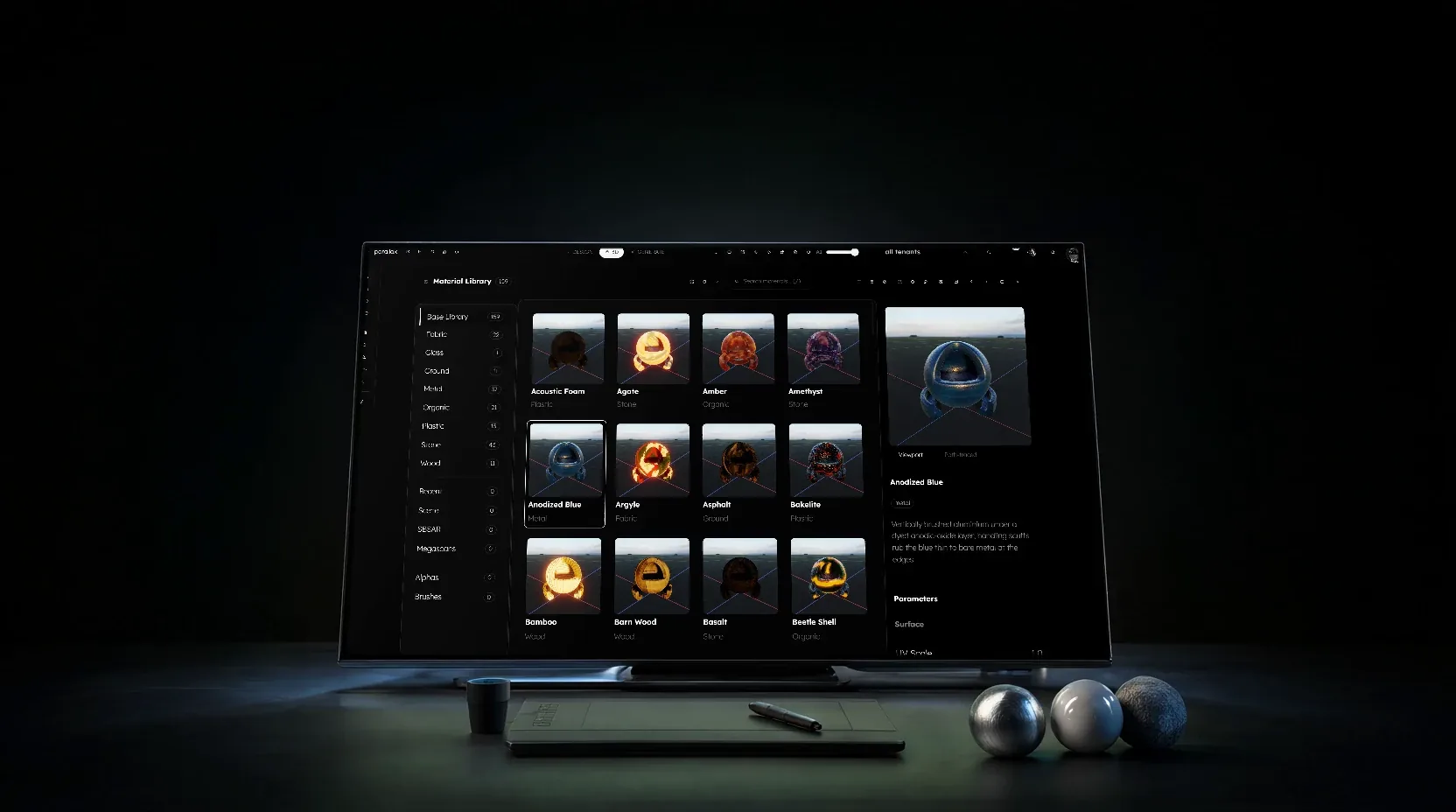
The library displays each of its 159 materials as a path-traced preview with 512 samples, not as a flat color tile. It is organized by categories such as fabric, glass, metal, stone, wood, and more, with search and recently used materials at the top. A material is placed on the selection with a single click or further developed in the graph, and what is created there is then available in the same library.
Video: Editing, Color and Subtitles
The video area displays clips on the same timeline as the animation. Color correction works with Lift, Gamma and Gain per channel, with a grayscale gradient as a control above it, and Scopes show what the eye deceives. Subtitles are created in the same document as the film they belong to.
Generated in Switzerland
Images and 3D models are generated on Orbit's own graphics card in Switzerland, not in a third-party cloud. A dedicated service keeps the models ready and processes one job after another. No model comes directly from the internet: Each one is stored in Orbit's own model repository, with revision and checksum, before it is used for the first time. Hunyuan3D-2mv is integrated for 3D shapes.
The orders are in a persistent queue, which the Generate area displays openly, with status, model, and progress. Anyone who changes their mind can cancel a running order. What a customer receives in images has never left the house.
Ten variants instead of one
Agents work in the same document as humans. With «Delegate», an intention is sent as a task to the Orbit agent. With «Speculate», the same intention runs multiple times in parallel, and the variants come back as a grid, ordered by the agent's confidence.
The document remains untouched until a human accepts a variant; the others expire. The machine suggests, the human decides, and a counter on the edge shows what the suggestions cost. Where it is faster to demonstrate something once, the agent learns from the example and repeats it on the rest.
No image, a building block
Between Parallax and Relay, a simple rule applies: Parallax delivers drafts, and they only become part of the fixed inventory through Relay's checks. Before every handover, Parallax shows exactly what would be sent: each building block as a real Web Component, the composite interface, and the brand foundation with its colors and fonts.
The path also leads back: Parallax displays the foundation, the building blocks, and the media of a Relay brand, so that a new design builds on what already applies. Nothing is lost between design and development, because there is no translation anymore.
The films of these pages
Since October 2, 2026, the films for Fallseiten are being created in Parallax at orbit.zuerich. A device photo is given a cut-out screen, inside which the actual page or app runs, and each film receives its own camera movement, exported frame by frame as a loop without sound.
Afterwards, every film is measured: frame count, black frames, hard cuts, and the transition at the end of the loop. The measurement even found an error in the in-house tool; it has been fixed, and every affected film has been re-exported.
Where ideas first become visible
Parallax is in use at Orbit every day. Next, the devices in the films will become 3D models, whose screen is a material, and the print module, which generates the order for Orbit's own 3D printers from a model, is waiting for its first use. What began as an editor for a surface has become the place where at Orbit a thought first takes shape.